Pixro vs MakeUGC: A Real MakeUGC Alternative for Sellers
You have a product photo on your phone and a marketplace listing that goes live Friday. What you need first isn't a spokesperson. It's the shot.
That one sentence is the whole difference between these two tools. MakeUGC makes AI avatars talk about your product in short ad videos. Pixro is an all-in-one, web-based AI creative platform that makes the product photos, virtual try-on, catalogue images, banners and video a store lists and sells with. Different core job. So this isn't "which is better" — it's "which problem are you solving today."
If you're a performance marketer who needs fifty talking-head ad variations to test on paid social, MakeUGC is built for exactly that. If you're a seller or brand who needs on-model photos, ghost-mannequin shots, a consistent catalogue, banners, AI influencers and reels from one place — that's the Pixro job, and it's where a MakeUGC alternative starts to make sense. Let's lay it out fairly.
Pixro vs MakeUGC: the short version
MakeUGC is a mature, focused UGC ad-video generator: pick an AI creator, paste a script, get a talking-head clip in minutes. Pixro is an all-in-one visual platform for ecommerce and fashion — 15+ AI tools in one browser app (product photoshoot, virtual try-on, ghost mannequin, flat-lay, bulk catalogue, banners/ads, AI influencers, edits, and 6+ live video tools for reels, product commercials and image-to-video). You drive it through an AI-agent chat that works like a full creative crew, and it orchestrates 40+ underlying models automatically so you never pick one yourself.
Pick MakeUGC if talking-avatar ad creative is your one deliverable. Pick Pixro if your listings, catalogue, ads and social need photos, try-on and video without stitching four subscriptions together.
At a glance
| Category | Pixro | MakeUGC |
|---|---|---|
| Core job | All-in-one AI creative platform: photos, try-on, catalogue, banners, video, AI influencers | AI-avatar UGC ad videos (talking-head creative) |
| Product photography | On-model, ghost mannequin, flat-lay, white-background photoshoots | Not offered |
| Virtual try-on | Garment-on-model try-on for apparel listings | Not offered |
| Bulk catalogue | Batch product images with a consistent look | Batch video generation, not catalogue stills |
| AI avatars / talking UGC | AI influencer imagery and video; talking-avatar ad scripting is not the focus | 500-1,000+ AI creators, custom avatars on higher tiers |
| Video | Live — 6+ video tools (AI reels, product commercials, image-to-video, UGC clips, fashion reels) | Deep, mature UGC ad-video toolset (Video Agent, batch, B-roll) |
| Banners & ads | Marketing banners and ad creative from your product | Not offered |
| How it works | Web app driven by an AI-agent chat; 40+ models auto-orchestrated per job | Web app: browse creators, paste a script, render |
| Delivery | Self-serve web + always-on automation (connect your store/URL/catalogue, get fresh creatives on a schedule); enterprise API | Self-serve web app; API on higher tiers |
| Entry price | $10/mo Trial (50 credits, ~30 photos/videos) | $59/mo Startup (500 credits) — as of July 2026, check their site |
Core features: two different toolboxes

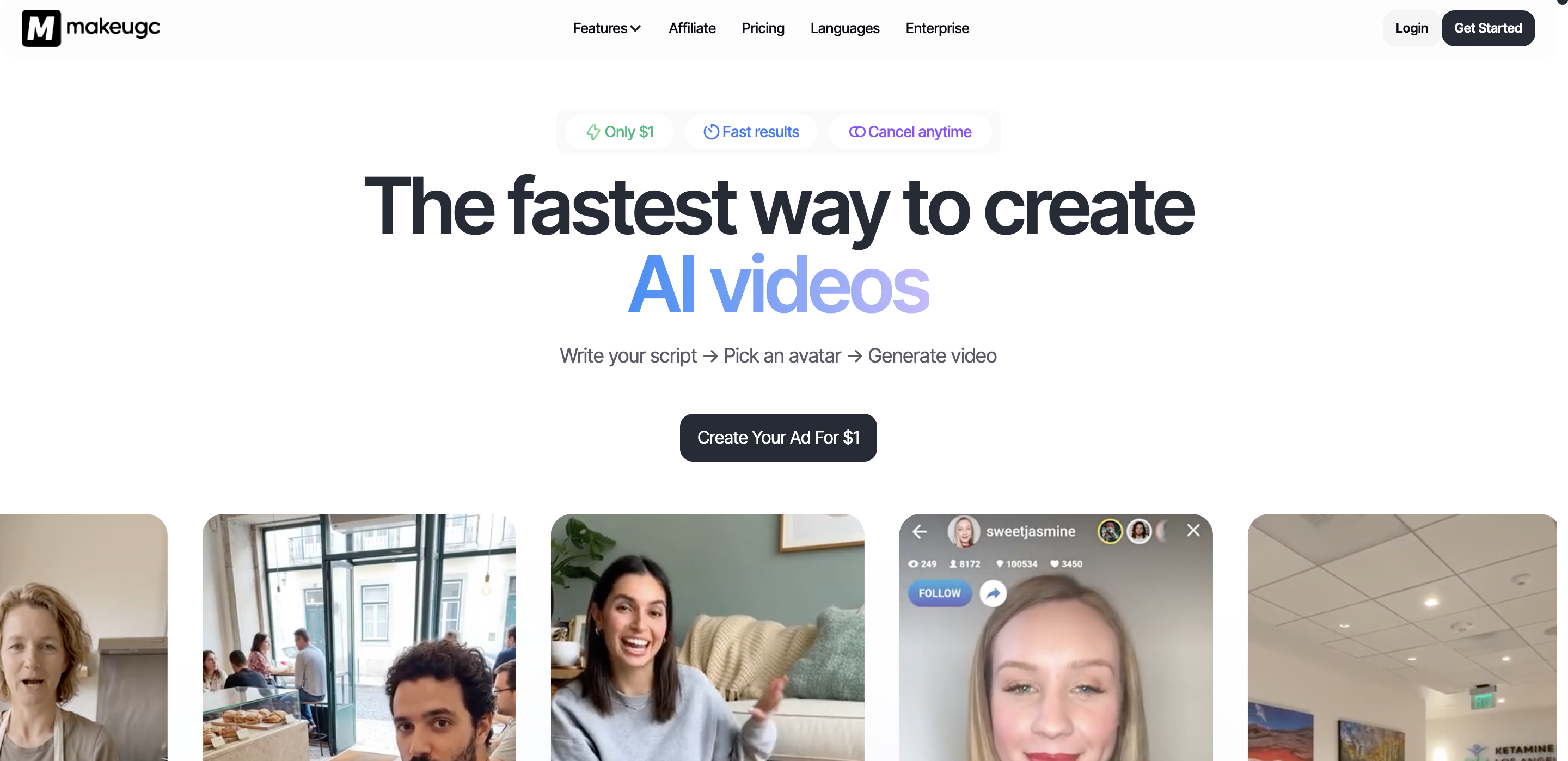
MakeUGC does one thing with real depth. You browse a library of AI creators across ages, ethnicities and settings, feed a script (or let its Video Agent draft one), and it renders a person holding or talking about your product. Higher tiers add custom avatars, product-in-hand shots, batch runs and B-roll. If ad-creative volume is the goal, that focus is a feature.
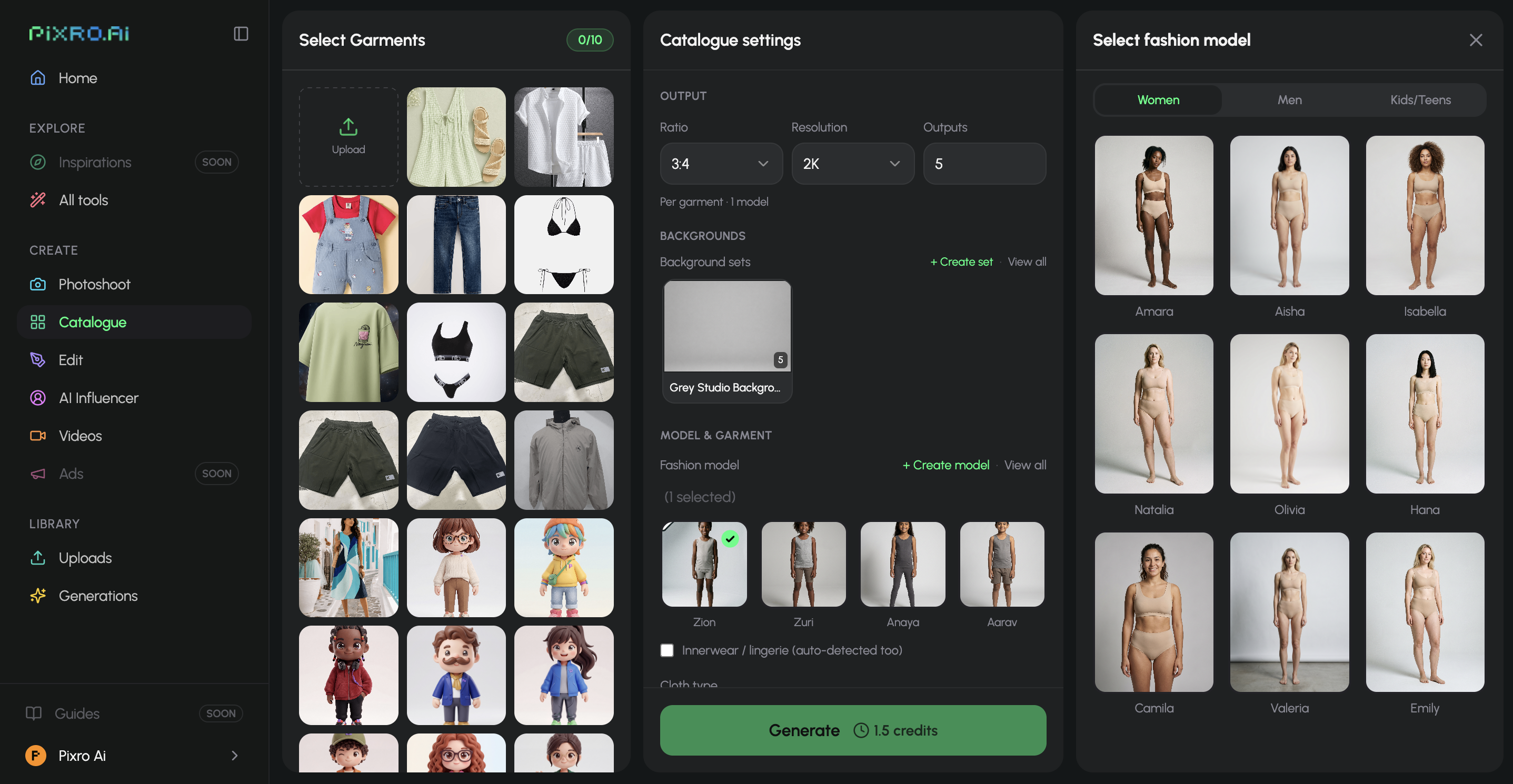
Pixro covers the part of the funnel before the ad — and now the ad video too. One phone photo becomes an on-model shot, a ghost-mannequin listing, a flat-lay, a clean white-background frame, or a batch of catalogue images that all match. It also produces banners, AI influencer imagery, and video across 6+ live tools — AI reels, product commercials, image-to-video and UGC-style clips. What ties the 15+ tools together is the AI-agent chat: you say what you want to create, and a team of AI agents — creative director, art director, photographer, video editor — plans and runs the job, auto-picking the best of 40+ underlying models (things like nano-banana, Veo 3, Kling, Runway, Flux, SeeDream, HeyGen) so you never have to. The reach is wider on purpose.
Here's the honest line: MakeUGC will out-produce Pixro on talking-avatar ad videos specifically — that's its whole craft. Pixro covers everything a listing needs to exist in the first place, plus its own video suite. One is a specialist. One is a platform.
Bottom line: choose MakeUGC if your only deliverable is avatar ad videos. Choose Pixro if you need the product's photos, try-on, banners and video from one tool.
Output and try-on quality
On its home turf — a person delivering a product pitch to camera — MakeUGC produces watchable clips fast. The most common gripe in user reviews is lip-sync accuracy on some renders, and captions, music and B-roll often have to be added afterward in something like CapCut. That's not a dealbreaker for a marketer already living in an editor; it's a step to budget for.
Pixro's quality question is different because the output is different. Does the hoodie drape like real cotton in the ghost-mannequin shot? Does the try-on put the garment on a body convincingly enough for a listing? Does a batch of 200 SKUs come back looking like one shoot instead of 200 accidents? Does the garment's colour, texture and logo stay consistent across a whole collection? That's the bar Pixro is built to clear — for one garment it can return roughly eight catalogue poses plus a reel and try-ons in under a minute — and it's a bar MakeUGC never tries to, because it doesn't do product stills or try-on at all.
Bottom line: choose MakeUGC for avatar ad clips. Choose Pixro when the quality that matters is the product photo and the try-on.
Catalogue consistency
If you sell more than a handful of SKUs, consistency is the quiet cost. A catalogue where every product sits on the same background, in the same light, framed the same way, converts better and looks like a brand. It's the kind of job HRX used Pixro for — 500+ catalogue images with a reported ~90% cut in production time — and the same batch discipline shows up for brands like The Roadster and Reliance Jewels.
Pixro treats that as a first-class job: batch a full catalogue and pull the look together across every image. MakeUGC batches videos, not catalogue stills — useful for spinning up ad variations, not for making 300 listings match. Different definition of "bulk."
Bottom line: choose MakeUGC to batch ad videos. Choose Pixro to make a whole catalogue of product images look like one shoot.
Image and video
This is where the tools almost touch, so let's be precise. MakeUGC is a genuinely mature video product built around one thing — talking-avatar ad creative — with Video Agent scripting, batch generation, B-roll and product-in-hand, and years of focus behind it. If AI ad video with a spokesperson is the whole point, it's ahead there, and I'll say so plainly.
Pixro ships a broader video suite today: 6+ live tools covering AI reels, product videos and commercials, image-to-video, fashion reels and UGC-style clips — all in the same platform as the photos, try-on, flat-lay, catalogue and banners. It's not a dedicated talking-avatar ad engine, and I won't pretend it out-scripts MakeUGC on that narrow craft. But video at Pixro is live and in production, not a promise. So if you want the strongest talking-avatar ad tool, that's MakeUGC. If you want photos, try-on and a real multi-format video suite in one place, that's Pixro.
Bottom line: choose MakeUGC for the deepest talking-avatar ad toolset. Choose Pixro if you want photos, try-on and a live multi-format video suite in the same tool.
Pricing: compare cost-per-asset, not sticker price
Sticker price alone misleads here because the two tools produce different assets. Compare what a small seller actually spends to get going.
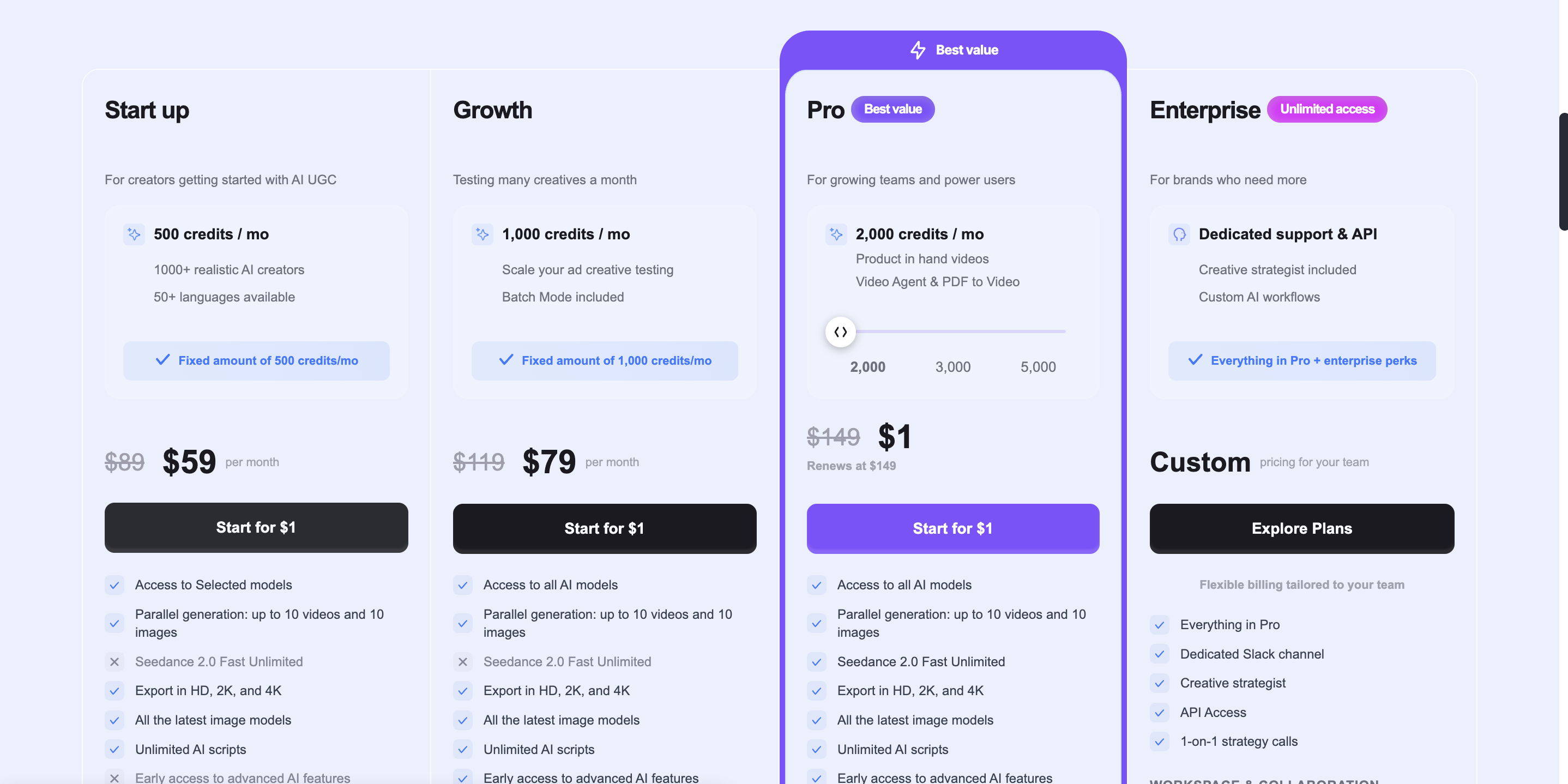
| Plan | Pixro | MakeUGC (as of July 2026 — check their site) |
|---|---|---|
| Entry | $10/mo Trial — 50 credits (~30 photos/videos) | $59/mo Startup — 500 credits |
| Mid | $30/mo Growth — 400 credits (~250 photos/videos) | $79/mo Growth — 1,000 credits |
| High | Business — custom (enterprise) | $149/mo Pro — 2,000 credits (custom avatar, product-in-hand) |
| API / add-ons | Pay-as-you-go credit packs; enterprise API | API from $99-$299/mo |
Both are credit-based, so read the credits, not just the dollars. The gap that matters for a bootstrapped store is the floor: Pixro starts at a $10 Trial, while MakeUGC's entry plan sits at $59/mo (as of July 2026 — verify on their site). For a seller generating, say, a couple hundred product images a month, Pixro's $30 Growth plan covers roughly 250 assets across photos, try-on, banners and video. MakeUGC's spend goes entirely to avatar ad videos — a different asset, and one many stores only need occasionally.
The point isn't a currency trick. It's cost-per-asset across everything a store needs. If you need photos, try-on, catalogue, banners and video, buying them separately — a photo tool plus MakeUGC plus an editor — costs more than one platform. If all you need is ad videos, that math flips and MakeUGC's focus can be the better buy.
Bottom line: choose MakeUGC if ad video is your whole budget. Choose Pixro for the lowest entry point and the most asset types per dollar.
Ease of access and workflow
Both tools are known for being easy to start — no studio, no crew, results in minutes. MakeUGC is a web app with a clean library-and-script flow: pick a creator, paste a script, render. It's a focused, desk-and-browser tool, and that simplicity is part of the appeal.
Pixro is a browser app at pixro.ai with a different entry point: an AI-agent chat that opens with "what do you want to create today." You describe the outcome and a crew of AI agents handles model choice, prompting and production behind the scenes. Beyond one-off jobs, you can connect your Shopify store, a website URL, a product catalogue or brand assets and let Pixro run on autopilot — set it once and get fresh ecommerce-, ad- and social-ready creatives on a schedule. For a store that doesn't want to babysit another dashboard, that always-on delivery is the real convenience.
Bottom line: choose MakeUGC for a focused script-to-video workflow. Choose Pixro if you want an AI-agent chat and always-on delivery wired into your store.
Support and trust
MakeUGC is the more established name in AI UGC, with a wide review footprint and thousands of companies claimed. That maturity is real and worth crediting. The recurring caution in public reviews is qualitative: some users report slow support and friction around refunds on renders they felt were low quality. Treat that as a "read the terms before you commit annually" note, not a verdict — experiences vary.
Pixro is the newer, ecommerce-focused platform: bootstrapped, with 20+ paying brands and 1,000+ signups, and hands-on support for sellers who don't want a ticket queue. It's narrower in track record than MakeUGC but built specifically around the visual jobs a store repeats every week.
Bottom line: choose MakeUGC for an established track record. Choose Pixro for a focused, hands-on ecommerce platform.
Who MakeUGC is best for
MakeUGC is the right pick if AI ad video is your actual deliverable: a performance marketer or agency spinning up dozens of talking-head variations to test on paid social, someone who wants custom avatars and product-in-hand clips at volume, and who's comfortable adding captions and B-roll in a separate editor. If that's you, its depth and focus beat a generalist. Buy the specialist.
Who Pixro is best for
Pixro fits the seller or fashion brand whose first problem is the product image, not the pitch. You have SKUs to list, a catalogue to keep consistent, apparel that needs try-on, banners for a sale, AI influencers for social, and short video — and you want it all from one AI-agent platform at a low entry price, ideally on autopilot from your store. If you'd rather describe what you want and let a creative crew of AI agents produce it than manage four subscriptions, that's the tell. And if you were searching for a MakeUGC alternative because you realized you needed photos, try-on and a full visual suite more than talking avatars, this is why.
Scorecard
| Dimension | Pixro | MakeUGC | Edge |
|---|---|---|---|
| All-in-one breadth (15+ tools) | Strong | Limited | Pixro |
| Product photography & try-on | Strong | Not offered | Pixro |
| Catalogue consistency | Strong | Limited | Pixro |
| Talking-avatar ad-video depth | Fair | Strong | MakeUGC |
| AI avatars / custom avatars | Fair | Strong | MakeUGC |
| Model range & auto-orchestration | Strong | Limited | Pixro |
| Entry price / cost-per-asset | Strong ($10 Trial) | Fair ($59 floor) | Pixro |
| Established review track record | Fair | Strong | MakeUGC |
Overall read: for a store that needs its products photographed, tried on, listed and turned into video, Pixro wins on breadth, model range and entry cost. For a team whose one job is talking-avatar ad video, MakeUGC earns its rows — buy it for that, and know it won't touch your product photography or try-on.
Switching: what transfers

Because the tools do different jobs, this is less a migration than an addition. If you're leaving MakeUGC, there's nothing to export — your product photos live wherever you shot them, and you bring those into Pixro to make on-model, ghost-mannequin, catalogue and video assets. If you keep MakeUGC for avatar ad videos, Pixro slots in upstream to produce the stills, try-on and reels those ads and listings need. Many sellers will find they only ever needed the photo-try-on-and-video half — and can drop the separate editor subscription that MakeUGC's missing captions and B-roll forced on them.
Want a wider look before you decide? Compare the video-first specialists in Pixro vs Keyla and Pixro vs Arcads, another UGC ad-video engine in Pixro vs Creatify, the try-on angle in Pixro vs Uwear, and the fashion-model generators in Botika vs FASHN vs Pixro.
FAQ
Is MakeUGC worth it?
If your deliverable is AI-avatar ad videos at volume, yes — it's a focused, mature tool built for exactly that, and it does it well. Just budget for an external editor for captions and B-roll, and read the refund terms before committing annually, since some users report friction there.
What's the best MakeUGC alternative?
It depends on what you actually need. For more ad-video avatars, look at tools like Arcads or Creatify. But if you realized you need product photos, virtual try-on, a consistent catalogue and your own video more than talking avatars, Pixro is the better MakeUGC alternative — an all-in-one AI creative platform with 15+ tools and 6+ live video tools, starting at a $10 Trial.
Does Pixro have a free plan?
Pixro is credit-based, and there's no permanently free tier. You can start with a free trial of the paid $10 Trial plan (50 credits, about 30 photos or videos) to see the output on your own products before you commit.
Is Pixro web-based, and how do I access it?
Yes. Pixro is a browser app at pixro.ai — sign in, open the AI-agent chat, and start creating; you can also connect your store or catalogue for always-on delivery. Need a hand? Reach the team on WhatsApp at +91 6364871993 or email hello@pixro.ai.
Can MakeUGC make product photos or virtual try-on?
No. MakeUGC generates avatar-led ad videos, not product stills, ghost-mannequin shots, flat-lays or garment try-on. If those are what you need, that's the gap a platform like Pixro fills.
The one photo test
Back to Friday's listing. If the thing standing between you and shipping is a talking spokesperson, MakeUGC is built for that. If it's the product shot, the try-on, the catalogue that all has to match, the banner and the reel — drop one photo into Pixro and see the on-model version before your coffee's cold, then judge it against your last studio invoice. Start with the $10 Trial and decide on your own products.








