
How to Shoot Studio-Quality Product Photos Without a Camera
It's 9pm. You're crouched on the kitchen floor with your phone, reshooting the same candle for the fifth time, because the one halfway-decent shot has a yellow cast that makes the wax look like old soap.
You don't need a better camera. You need a better process.
Studio-quality product photos have almost nothing to do with owning a studio. They come down to control: even light, true colour, a clean background, the same framing every time. The camera was never the hard part. The control was. And control is exactly what AI can now hand you, from a single phone photo, no camera required, in about the time it takes to make tea.
Here's how to get there without a camera, a softbox, or a free Saturday. Last updated: June 2026.
What "studio quality" actually means (and why it isn't the gear)
Strip away the mystique and a studio shot is just four things done well: clean even lighting, accurate colour, a distraction-free background, and consistent framing across every product.
That's the whole list.
Notice what's not on it: a $2,000 camera body. A photographer's eye. A room with blackout blinds. Those are the old way of buying the four things above, expensive proxies for light, colour, background, and consistency. AI gets you the same four directly. For the full picture of how this works end to end, our complete guide to AI product photography walks the whole pipeline.
What you actually need (and what you can skip)
The honest kit list is short.
You need: the product, a phone, a window, and a plain surface. That's the studio.
You can skip the DSLR, the lighting rig, the seamless-paper backdrop, the tripod, the editing software, and the afternoon you'd have lost to all of it. Tools like Pixro take a clean-ish phone photo and rebuild it into a polished, channel-ready image, background and lighting and all.
No camera. No studio. No problem.
The workflow: from phone snap to polished image
The short version: shoot a clean input, upload it, pick the look, generate, refine, export. Step by step:
Take one clean input photo. Plain background, even light, product filling most of the frame, phone held steady. You're not making the final image here. You're handing the AI good raw material. (More on that in the next section.)
Upload it and choose the look. In Pixro you pick what you're after: a product on a clean studio background, a lifestyle scene, a ghost-mannequin shot for apparel, a flat-lay, or a background swap on the photo you already have.
Generate. The model relights the product, cleans the background, and outputs a studio-style image in seconds. No prompt-craft degree required.
Review and regenerate. Eyeball the edges, the shadow, the colour. Something off? Regenerate or nudge the settings. This is the part a real studio can't match: try ten looks before lunch.
Export channel-ready. Pull clean files sized for Shopify, Amazon, Flipkart, or your socials. Same product, consistent set, done.
Running a whole catalogue instead of one hero shot? The same process batches, which we cover in the bulk catalogue playbook.
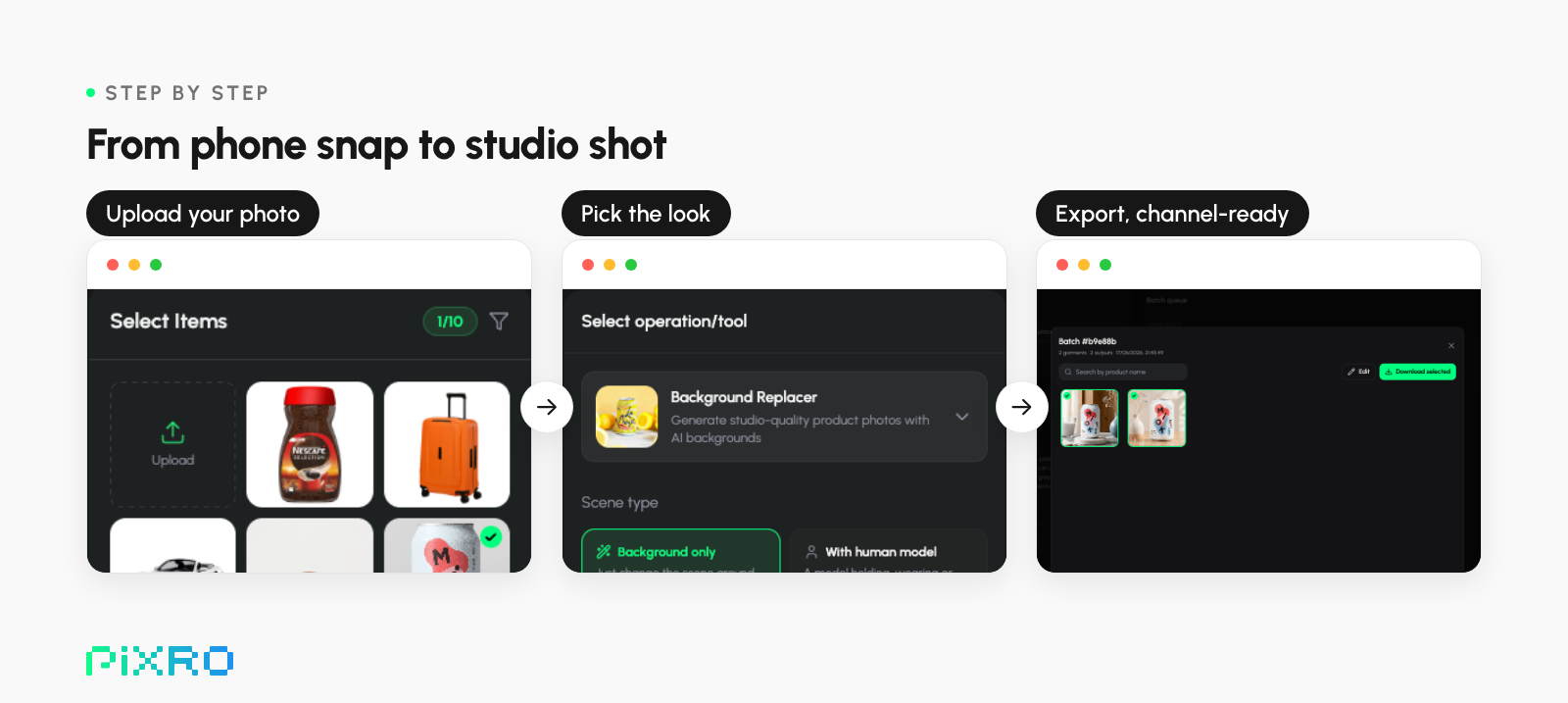
The whole workflow: upload your product photo, pick the look, export channel-ready files.
Clean inputs in: a 90-second phone setup
One rule decides everything here: garbage in, garbage out. Feed the AI a dark, cluttered snap and you get a polished version of a dark, cluttered snap. Give it a clean input and the results get genuinely good.
Three habits do most of the work:
Light it from the side, near a window. Soft daylight beats your ceiling bulb and its yellow cast. Skip harsh midday sun. You want even, not dramatic.
Kill the clutter. A plain wall, a sheet of paper, a clean table. The simpler the background, the cleaner the cut-out.
Fill the frame and hold still. Get close, keep the whole product in shot, brace your elbows. Sharp-and-well-lit beats fancy-and-blurry.
Steam the wrinkles, wipe the dust, square the product up. Two minutes of prep on the input saves ten regenerations later.
How close is it to a real studio, honestly?
Honest answer: closer than you'd expect, and the gap keeps shrinking. But it isn't magic.
Where AI clearly wins is speed, cost, and consistency at scale. Pixro's own published figures put it at up to 99% cheaper and around 10x faster than a traditional shoot, and every image runs through the same process, so your product grid looks like a real set instead of forty slightly-different photos. It's the same engine for apparel, too, producing on-model and virtual try-on shots from one flat garment photo.
Where a real studio still edges ahead: the hero campaign shot, tricky reflective or transparent materials like glass and fine jewellery, and the macro detail a luxury buyer leans in to inspect. For the other 90% of a catalogue, the workhorse listing images that carry most of your sales, AI is already there.
The pattern most stores settle on: AI for the catalogue, a real shoot saved for the one or two campaign heroes. Trusted by 5,000+ companies, including names like Myntra and HRX, Pixro is built for exactly that workhorse job.
What it costs to start
Less than a single freelance photo. A professional product image commonly runs $50 to $200 from a freelancer, and a full styled listing set can land anywhere from $300 to $1,200 per product.
Pixro is credit-based and starts at $10/mo (₹749 in India) on the Trial plan, about 50 credits or roughly 30 images and videos, with a Growth plan at $30/mo (₹2,159) for higher volume. There's no permanently-free tier, but the trial is the full toolset, so you can prove it on your own products before committing. We break the full math down in our guide to what product photography really costs.
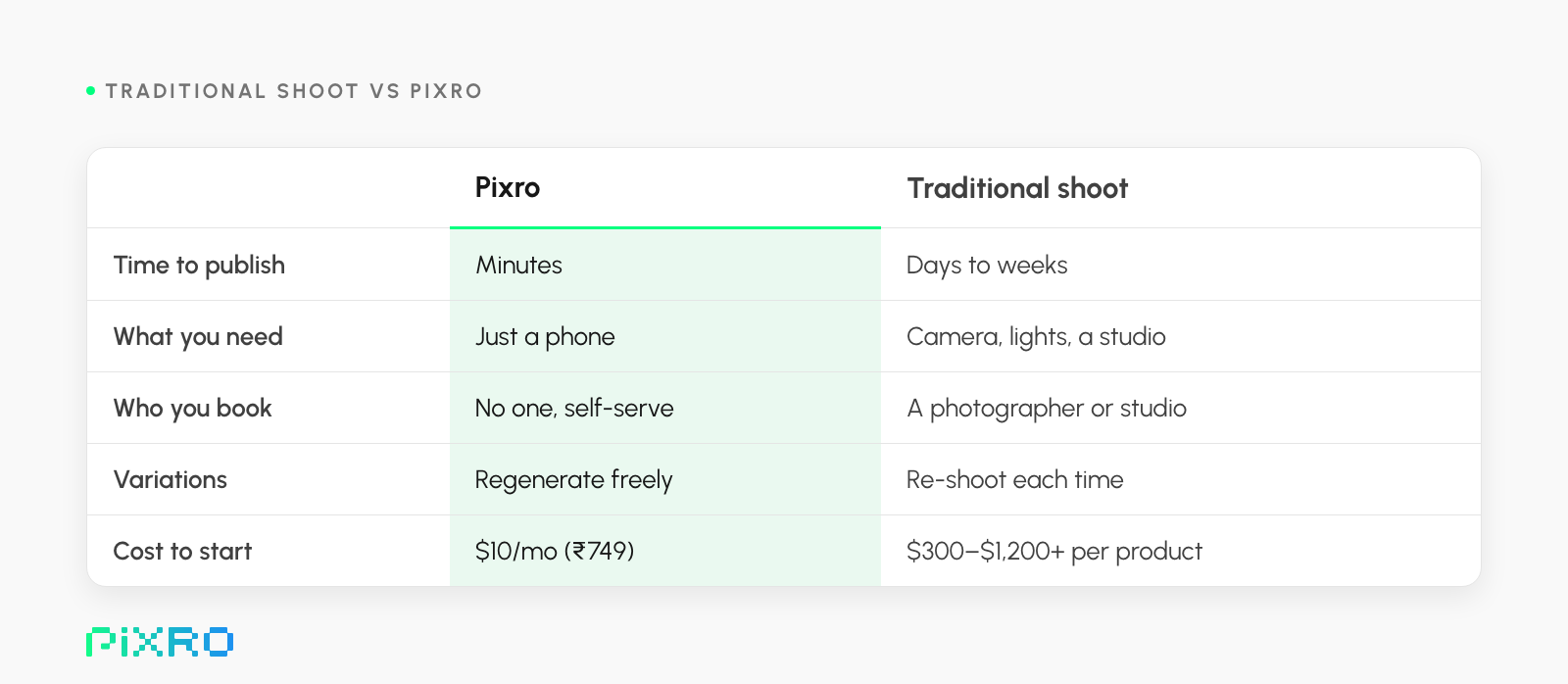
Studio-quality without the studio or the wait: minutes from a phone at $10/mo (₹749), vs $300–$1,200+ per product for a traditional shoot.
A note on the figures: Pixro’s pricing and the “up to 99% cheaper / around 10x faster” comparisons are Pixro’s own published numbers (2026); the photography cost ranges are typical market rates that vary by region, product and photographer.
Frequently asked questions
Can AI really match a professional studio photo?
For standard catalogue and listing images, clean backgrounds, on-model apparel, and lifestyle scenes, AI now produces studio-grade results from a phone photo. For ultra-premium hero shots or tricky reflective and transparent materials, a traditional studio still has an edge. Most brands use AI for the bulk of the catalogue and reserve a real shoot for a campaign hero or two.
Do I need any camera gear at all?
No camera, lights, or backdrop. A recent phone, a window for soft daylight, and a plain surface are enough to capture a clean input. The AI handles the lighting, background, and finishing from there.
Will the colours and product details stay accurate?
Accuracy starts with the input. Shoot in soft, even light so colours read true and details stay sharp, then review each result and regenerate if anything drifts. Good input plus a quick review keeps your product looking like your product.
How much does it cost to get started?
Pixro is credit-based and starts at $10/mo (₹749 in India) on the Trial plan, roughly 50 credits or about 30 images and videos, with a Growth plan at $30/mo (₹2,159) for higher volume. That's less than a single freelance product photo.
What kinds of products work best?
Apparel, accessories, packaged goods, homeware, beauty, and most physical products with a clear shape photograph well. Highly reflective or transparent items like glass and fine jewellery are the hardest and may still benefit from a specialist shoot.
Your move
Back to that candle on the kitchen floor.
The fix was never a better camera. It was a clean phone photo and a process that does the studio part for you. You don't need a studio to make studio-quality photos. You need control, and that's now a ten-minute job.
So go pull your worst-performing listing, the one you've been quietly avoiding, and redo just that one. One product, ten minutes, the $10 trial. Hold the new shot next to the old one. You be the judge.








