Pixro vs Modelia: The Modelia AI Alternative Compared
You laid a dress flat on the floor, shot it with your phone, and now a marketplace deadline is staring back at you. Both of these tools turn that flat shot into a model wearing the dress. The difference is everything that happens before and after the click.
Pixro vs Modelia: the short version
Modelia is a polished, self-serve AI fashion model generator built around a credits dashboard, a native Shopify app, and an API. It is a strong pick if you live inside a Shopify store, want to buy credits by the tier, and are happy to drive the whole thing yourself.
Pixro is an all-in-one, web-based AI creative platform — think of it as your always-on AI creative agency. In one browser app you get 15+ AI tools: product photoshoot, virtual try-on, ghost mannequin, flat-lay, bulk catalogue, banners and ads, AI influencers, edits, and 6+ video tools. You describe what you want in an AI-agent chat, and a crew of AI agents — creative director, art director, photographer, video editor — takes it from there, auto-picking the best model for each job from 40+ under the hood. Pixro wins when you want the boring part done for you and you need far more than model shots.
Pick Modelia for a self-serve dashboard on Shopify. Pick Pixro for breadth, video, and an AI-agent workflow that acts like a full creative team.
| Category | Pixro | Modelia |
|---|---|---|
| Core job | All-in-one AI creative platform (15+ tools) | Flatlay-to-model generator + video |
| Try-on / on-model | On-model, ghost mannequin, flat-lay | Flatlay-to-model, mannequin-to-model, model swap |
| Catalogue at scale | Bulk catalogue built in | Batch generation on higher tiers |
| Beyond model shots | Banners, ads, AI influencers, reels, edits | Model, outfit, pose, video only |
| Video | 6+ video tools live (reels, product videos, image-to-video, UGC) | AI video, 5s and 10s |
| Workflow | AI-agent chat + 40+ auto-orchestrated models | Self-serve dashboard + Shopify app + API |
| Delivery | Web app + always-on automation to store/ad/social | Self-serve dashboard + Shopify app + API |
| Pricing | $10 Trial (50 cr) / $30 Growth (400 cr) / custom | Free start, then $12 one-time up to $300/mo |
| Best for | Sellers who want breadth, video, done for them | Shopify stores who want a self-serve dashboard |
Both prices are current as of July 2026 — check each site before you buy, since credit tools move fast.
Core features: a suite vs a specialist
Modelia does one job and does it cleanly. Flat lay in, model out. Around that core it stacks a tidy set of tools — outfit generator, model swap, mannequin-to-model, and a pose tool it calls Repose — so you can vary a look without reshooting. If your whole problem is "I have garments and no models," that is a focused, well-built answer.
Pixro starts from the same flat shot and keeps going — a lot further. On-model and ghost mannequin, yes, but also flat-lay styling, bulk catalogue runs, marketing banners and ads, AI influencers for social, product videos and reels, and everyday edits. That is 15+ tools in one web app, so a single subscription covers the model shot and the sale banner and the founder-face content and the reel. Behind the scenes, Pixro orchestrates 40+ models automatically (nano-banana, Veo 3, Kling, Runway, Flux, SeeDream, HeyGen and more), so you get the best engine for each job without choosing one yourself.
The honest trade: a specialist tool can feel tighter at its one job, while a platform asks you to learn a little more surface in exchange for never leaving to do the next thing — and never picking a model.
Choose Modelia if model generation is the only gap you are filling. Choose Pixro if your week also includes banners, social content, video, and a full catalogue.
Output and try-on quality

Both tools produce clean, commercial on-model imagery, and users report Modelia's realism holds up well across its toolset. This is not a category where one side is obviously ugly — the plumbing under modern fashion AI is close, and the input photo decides a lot.
Feed either tool a crumpled snap on your bed and you get a crumpled result on a body. Feed it a garment shot flat, lit evenly, wrinkles smoothed, and both hold their own. The edge comes from your flat lay, not the logo on the dashboard.
Where Pixro leans in is fit for marketplace listings — output framed for the specs a listing actually needs, not just a pretty render. Because Pixro auto-routes each job across 40+ models, it leans on whichever engine is strongest for a given garment, pose, or crop.
Choose Modelia if you want a focused model-shot pipeline. Choose Pixro if you want output already shaped for where it ships.
Catalogue consistency
One model shot is easy. Two hundred that look like the same brand is the real job.
Modelia handles scale through batch generation on its higher tiers and consistent-character limits that climb with price — one character on the $12 project plan, up to six on Pro, unlimited on Business. That is a clean model, but it ties your consistency ceiling to your spend.
Pixro treats bulk catalogue as a first-class job rather than a tier unlock — the point is running many SKUs to one look so a collection page reads as one shoot, not fifty, holding garment colour, texture and logo steady across the set. In practice, brands have run 500+ catalogue images this way; one apparel brand cut catalogue production time by around 90%.
Choose Modelia if you want character limits that scale by plan. Choose Pixro if catalogue-wide consistency is the whole reason you are here.
Image and video
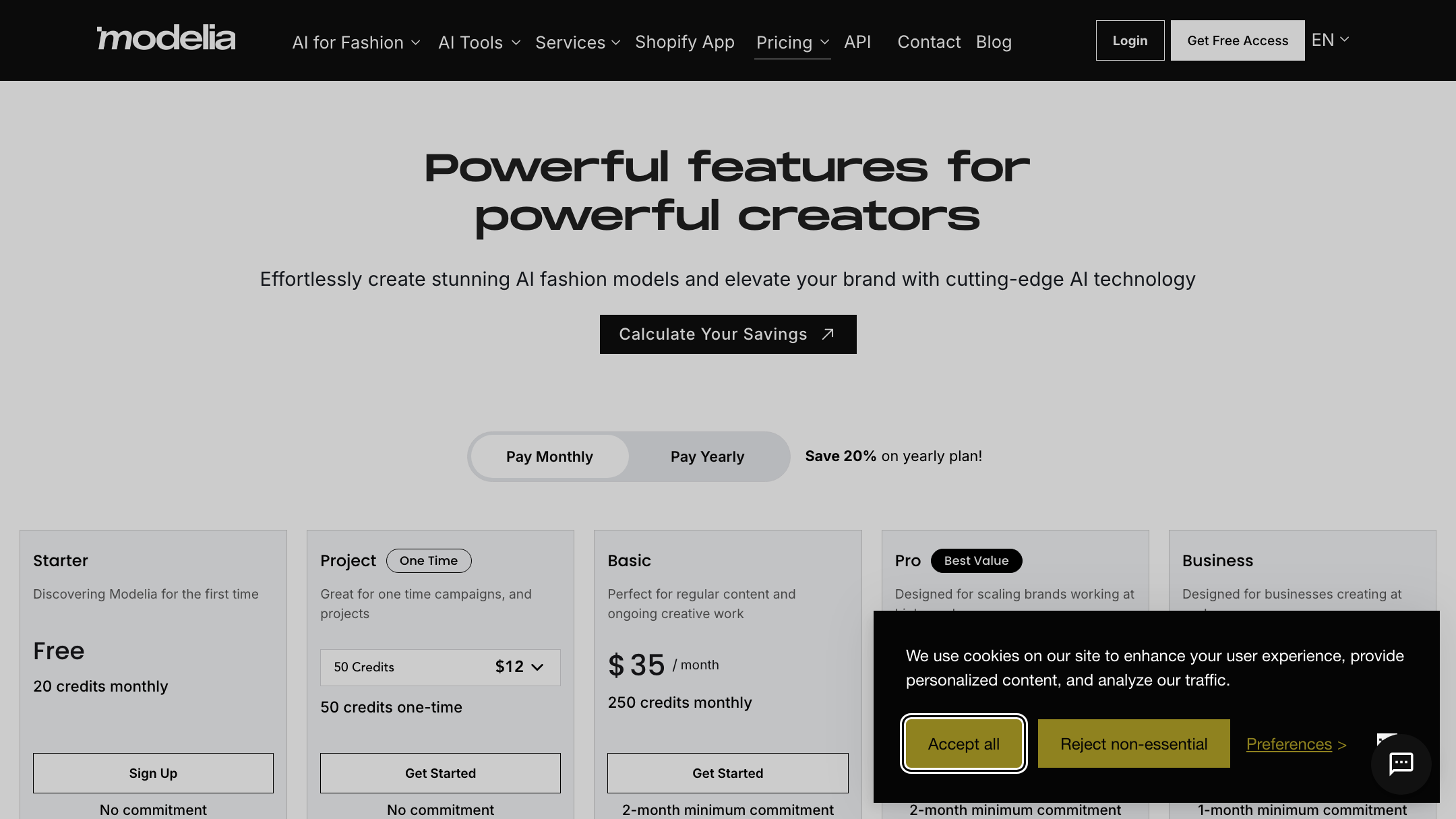
Video is fully live on Pixro today. Pixro ships 6+ video tools in production: AI reels, product videos and commercials, image-to-video, UGC-style videos, and a fashion reel maker. For a single garment you can generate roughly eight catalogue poses, a reel, and try-ons in under a minute, from one place.
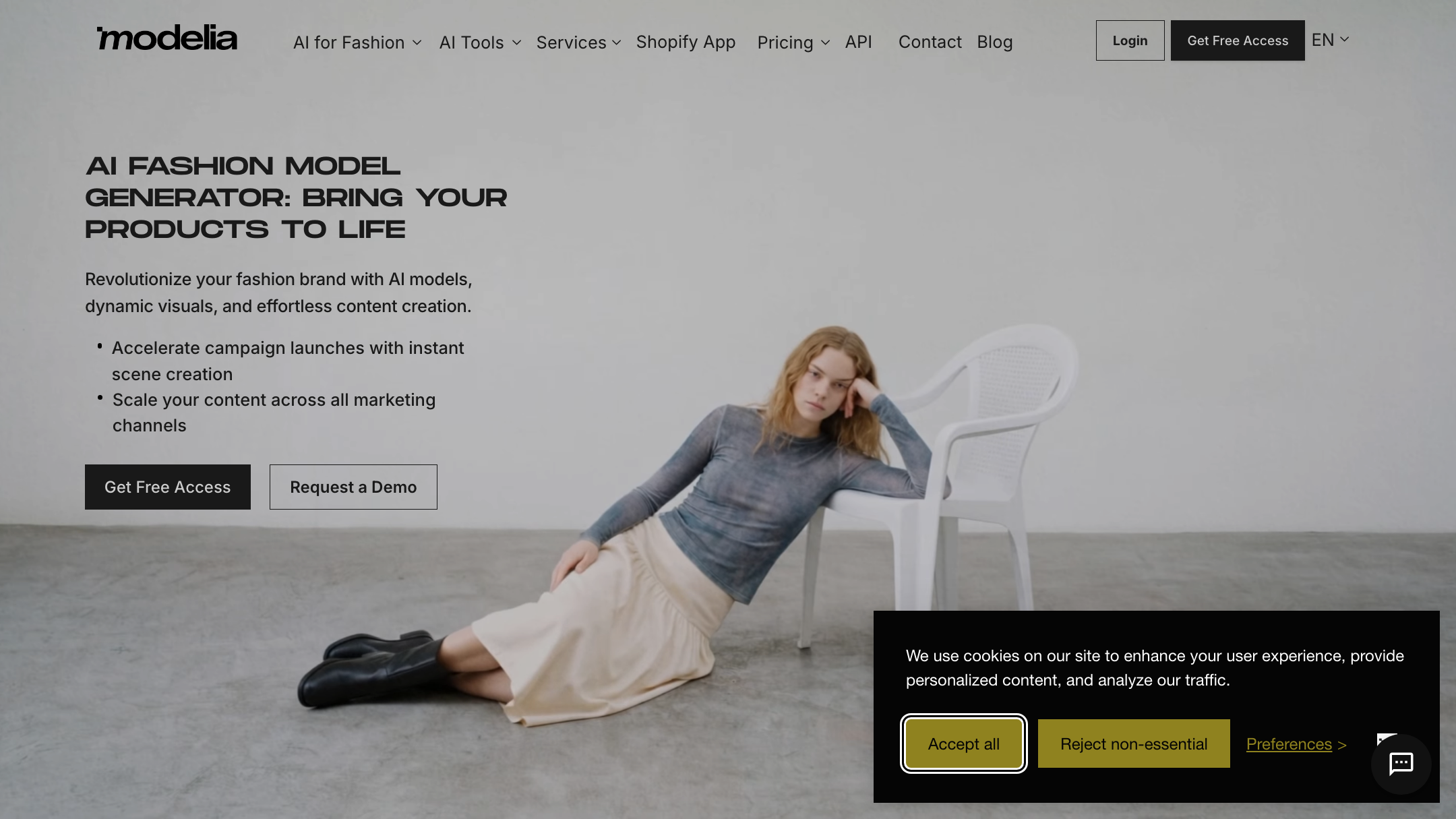
Modelia's video is also real and worth crediting — its AI video generator is priced openly at 25 credits for a 5-second clip and 40 for 10 seconds, tightly focused on short model video. So both sides ship video. The difference is spread: Modelia gives you clean short model clips, while Pixro spans reels, product commercials, image-to-video and UGC alongside its 15+ still tools.
Choose Modelia if you want a focused short-model-video tool. Choose Pixro if you want the widest spread of video and still formats from one app.
Pricing
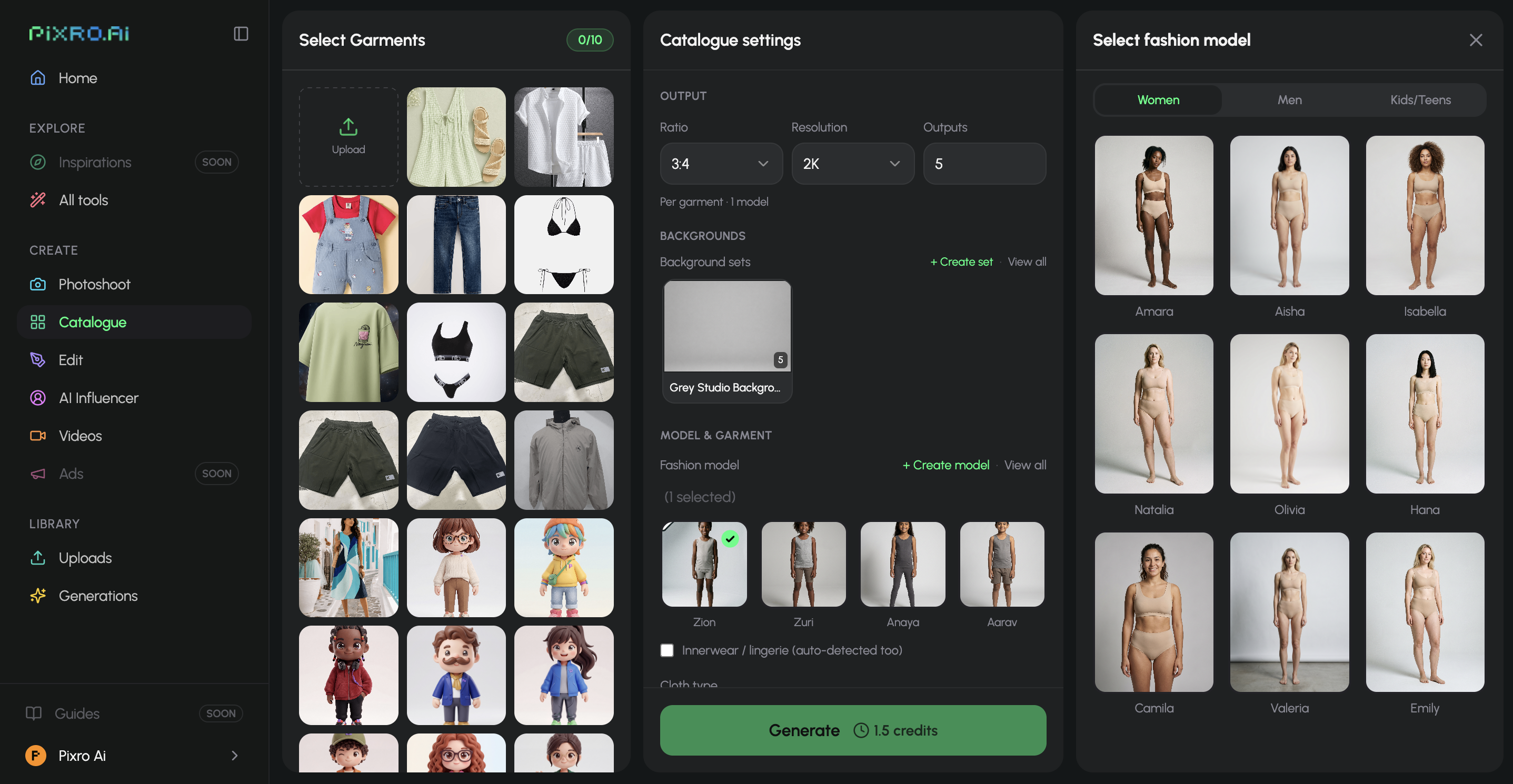
This is Modelia's most transparent quality, and it is worth crediting. As of July 2026, Modelia runs a free Starter tier (20 credits, watermarked, non-commercial), a one-time $12 Project plan (50 credits, commercial rights), then Basic at $35/mo (250 credits, plus API), Pro at $85/mo (750 credits), and Business at $300/mo (3,000 credits, unlimited characters). Granular, easy to read, easy to start free. Verify it on their site — credit tools change often.
Pixro is credit-based too, kept to fewer lines. The $10 Trial gives you 50 credits (roughly 30 photos or videos). Growth is $30/mo for 400 credits (roughly 250). Business is custom for unlimited use, with enterprise APIs. There is no permanently free tier — you get a free trial of the paid Trial plan, then you pick a lane. Pay-as-you-go credit packs are there too.
| Plan | Pixro | Modelia (as of Jul 2026) |
|---|---|---|
| Entry | $10 Trial — 50 credits | Free — 20 credits, watermarked |
| One-time | — | $12 Project — 50 credits |
| Mid | $30 Growth — 400 credits | $35/mo Basic — 250 credits + API |
| Upper | Custom Business — unlimited | $85/mo Pro — 750 credits |
| Top | Custom Business — unlimited | $300/mo Business — 3,000 credits |
For a store making ~200 images a month, both land in a similar monthly range — Pixro's $30 Growth against Modelia's $35 Basic. The difference is not the number. It is that Pixro's 400 credits also cover banners, ads, flat-lay, AI influencers and video, while Modelia's credits stay pointed at model generation and short video. Read the credit value against everything you actually make, not just the model shot.
Choose Modelia if you want a free start and granular tiers to climb. Choose Pixro if you want fewer lines and credits that stretch across more formats.
Ease of access and workflow
This is the real fork in the road.
Modelia is self-serve. You log into a dashboard, spend credits, and drive. If you are on Shopify, its native app drops the tool where your catalogue already lives, and the API is there for teams that want to wire it in. Clean, modern, and entirely on you to operate.
Pixro is a web app too, but the way in is a chat, not a control panel. You open pixro.ai, tell the AI-agent chat what you want to create, and a team of AI agents runs it — auto-picking models, generating the shots, and shaping them for where they will ship. Connect your Shopify store, a website URL, a product catalogue or your brand assets, and Pixro can run on always-on automation: set it once and get fresh, ecommerce-ready, ad-ready and social-ready creatives on a schedule. For a founder without a dev, that is the difference between "another dashboard to operate" and "describe it once, get the assets."
Choose Modelia if you want a dashboard and a Shopify app you drive by hand. Choose Pixro if you want an AI-agent chat and always-on automation that does the driving.
Support
Credit Modelia here — its support earns real praise, with users describing fast, helpful replies and even the CEO answering on a Sunday. For a self-serve tool, responsive humans behind it matter, and Modelia clears that bar.
Pixro backs its web app with a responsive team too — you can reach a real person quickly when a run needs a nudge. Different shape, same goal: you are not stuck alone with a dashboard.
Choose Modelia if you want strong, well-reviewed self-serve support. Choose Pixro if you want a responsive team behind an AI-agent workflow.
Who Modelia is best for
Modelia is a genuinely good fit if you run a Shopify store, want a native app and API, and are comfortable operating a credits dashboard yourself. Its granular pricing lets you start free and scale one tier at a time, its consistent-character limits grow with spend, and its short model video is live today. If model generation and short video are your whole ask, it is a focused, well-supported tool — and it has drawn work from sizeable fashion brands, which says something about the polish.
Who Pixro is best for
Pixro fits the seller who tried a slick self-serve tool and realized the dashboard was one more thing to run — and that model shots were only half the job. If you want breadth from one place (model shots, banners, ads, AI influencers, a full catalogue, and video), an AI-agent chat that works like a creative team, and always-on delivery to your store and channels, Pixro is built for you. It is used by 20+ paying brands including HRX, The Roadster, Reliance Jewels, The Kids Label and Karma Dori, and it is especially strong for founders who want done-for-you output without picking a model or wiring up a stack.
| Dimension | Pixro | Modelia | Edge |
|---|---|---|---|
| All-in-one breadth | ●●●●● | ●●●○○ | Pixro |
| On-model quality | ●●●●○ | ●●●●○ | Tie |
| Catalogue consistency | ●●●●● | ●●●○○ | Pixro |
| Video + reels | ●●●●○ | ●●●○○ | Pixro |
| Model range (auto-orchestration) | ●●●●● | ●●○○○ | Pixro |
| Pricing transparency | ●●●●○ | ●●●●● | Modelia |
| Shopify app + API | ●●●○○ | ●●●●● | Modelia |
Overall read: Modelia wins the dashboard-and-integration game — a slick self-serve panel, granular pricing, and a native Shopify app and API. Pixro wins the breadth-and-workflow game — 15+ tools with live video, 40+ auto-orchestrated models, and an AI-agent chat with always-on delivery. Match the winner to how you actually want to work.
Switching from Modelia: what transfers

Good news first — the hard asset moves with you. Your product photos, flat lays, and garment shots are the real inputs, and they work in Pixro the same way they worked in Modelia. Lay the garment flat, light it evenly, and the input you already learned to shoot carries straight over.
What changes is the workflow, not the craft. Instead of buying a credit tier and driving a dashboard, you open the web app and tell the AI-agent chat what you need — the shots come back shaped for where they ship, and you can extend the same look into banners, reels and a full catalogue. Consistent-character setups don't port between tools, so plan to re-establish your key looks once.
If you want to see how Pixro stacks up against other model generators before you commit, compare Pixro vs FASHN, Pixro vs OnModel AI, and Pixro vs Caimera. For a three-way read on model generators, see Pixro vs Botika vs FASHN, and for the wider field, the best AI product photoshoot tools guide.
FAQ
Is Modelia worth it?
If you run a Shopify store and want a polished self-serve model generator with live short video and strong support, yes — Modelia is a well-built, well-liked tool. It is less of a fit if you need banners, ads, AI influencers, a broad video suite, or done-for-you delivery, since it stays focused on model generation and short video.
What is the best Modelia AI alternative?
For sellers who want more than model shots and prefer not to run a credits dashboard, Pixro is the closest alternative — an all-in-one web platform (try-on, ghost mannequin, catalogue, banners, ads, AI influencers, and 6+ video tools) driven by an AI-agent chat. Compare it directly in Pixro vs OnModel AI to see the trade-offs.
Does Pixro have a free plan?
Pixro is credit-based, with a free trial of the paid Trial plan rather than a permanently free tier. The Trial is $10/mo for 50 credits (about 30 photos or videos), and Growth is $30/mo for 400 credits. You test it free, then pick a plan.
Is Pixro web-based, and how do I access it?
Yes — Pixro is a browser app at pixro.ai. You sign in, open the AI-agent chat, and describe what you want to create; a team of AI agents generates it and shapes it for where it ships. If you want to talk to a human first, you can reach the team on WhatsApp at +91 6364871993 or by email at hello@pixro.ai.
Can Pixro do more than on-model shots?
That is the main reason to choose it over a specialist. The same product can become an on-model image, a ghost mannequin, a flat-lay, a marketing banner or ad, AI influencer content, or a product video and reel — all from one web app, with 40+ models auto-picked per job.
The one next step
You still have that flat-lay photo on your phone. Modelia will turn it into a model shot on a dashboard you drive. Pixro will turn it into a model shot — and a banner, a reel, and a catalogue run — from one line of chat.
Drop one product into the $10 Trial at pixro.ai this afternoon and judge the output against your last shoot. If the AI-agent version saves you an hour, you already know which way to go.








