Pixro vs SellerPic: Best SellerPic Alternative India
Two tools. Same party trick.
Feed either one a flat shot of a kurta and it hands back an on-model photo, a jewellery try-on, a short product video. On a feature checklist, Pixro and SellerPic look like twins. So the real question isn't what can it do — it's how much of your workflow lives in one place, how many tools you get for one balance, and what each credit actually buys.
That's where they split.
The short answer: which one for you
SellerPic is a solid self-serve studio for sellers comfortable in a USD dashboard — strong AI models, a dedicated jewellery try-on flow, a live Shopify app, and a named lip-sync video feature. Pixro does the same fashion and product work, then goes much wider: it's an all-in-one, web-based AI creative platform with 15+ AI tools in one place — product photoshoot, virtual try-on, ghost mannequin, flat-lay, bulk catalogue, banners, edits, AI influencers, and 6+ live video tools — all driven by an AI-agent chat that works like a full creative team and auto-picks from 40+ underlying models. Both bill in USD credits; at the $30 tier Pixro hands you 400 credits against SellerPic's 200 for $29 (per each site's pricing page, as of July 2026). If you want breadth in one place, live video and more credits per dollar at the tiers most sellers buy, Pixro wins. If you live inside Shopify and want a polished point studio with a big bulk credit bucket, SellerPic is a fair pick.
At a glance
| Category | Pixro | SellerPic |
|---|---|---|
| What it is | All-in-one web-based AI creative platform — 15+ tools, driven by an AI-agent chat | Self-serve AI product-photo studio, web + Shopify app |
| AI model photoshoot | On-model shots, model swap, multi-angle, AI influencers | AI model swap, multi-angle |
| Virtual try-on | Cloth, accessories, eyewear, shoes, jewellery | Apparel + a dedicated jewellery try-on flow |
| Catalogue at scale | Bulk catalogue builder, ghost mannequin, flat-lay | Auto-resize for Amazon / Shopify / TikTok |
| Video | 6+ live video tools — AI reels, product video, image-to-video, UGC, fashion reels | Image-to-video, incl. named lip-sync |
| Model range | 40+ models auto-orchestrated per job | Single-vendor pipeline |
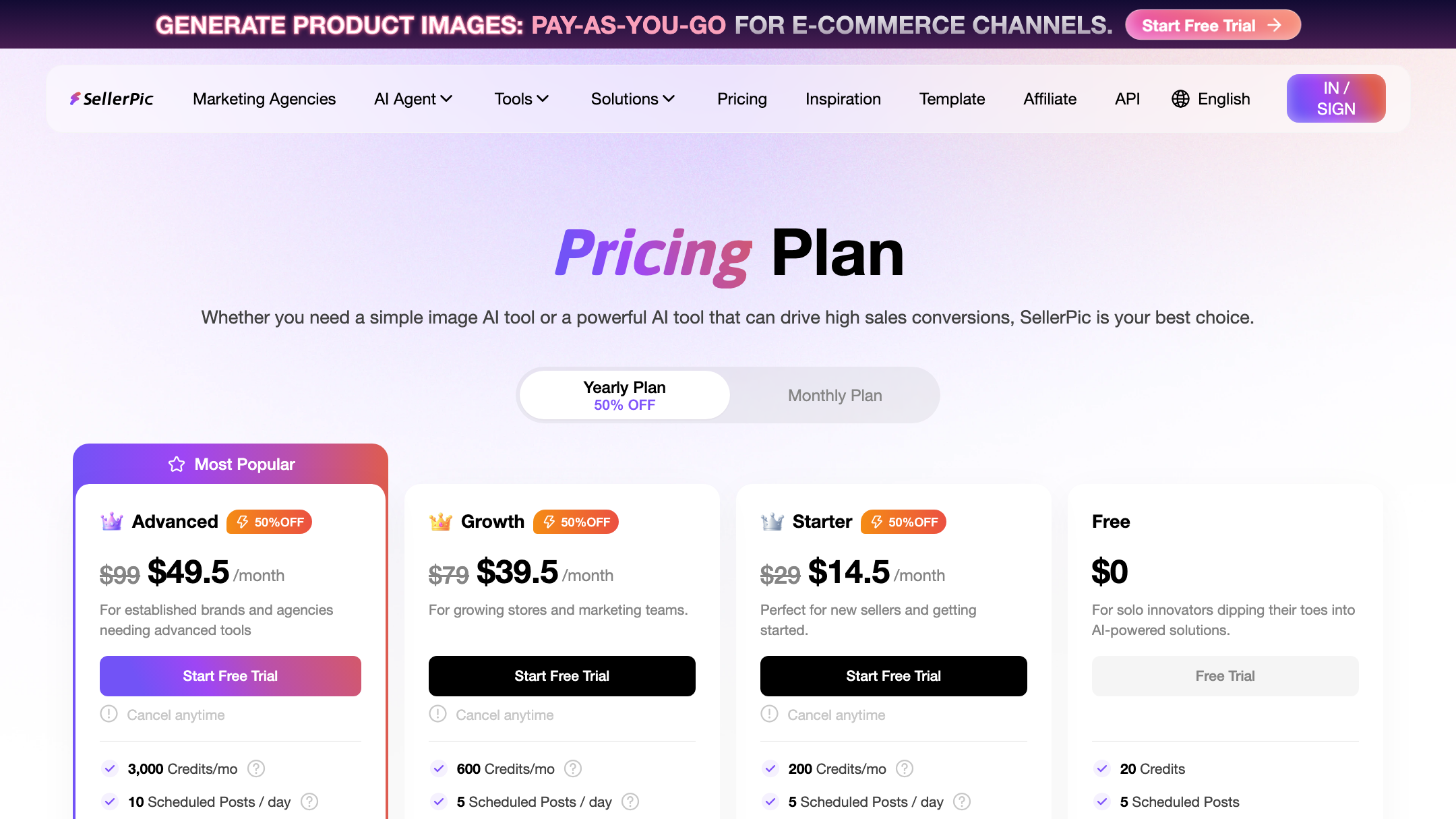
| Pricing | USD credits: $10 / 50 cr · $30 / 400 cr · Business custom | USD credits: Free 20 · $29–$99 / 200–3,000 cr |
| Delivery | Self-serve web app + always-on automation to store / ad / social | Web dashboard / Shopify app |
Now the parts that actually decide it.
Core features: a near-twin, with two real differences

Let's be fair — SellerPic is genuinely capable. AI model swap across angles, apparel try-on, marketplace auto-resizing. Reviewers on the Shopify App Store rate it well (as of mid-2026), repeatedly praising the image quality and how little tech skill it demands.
Pixro covers the same ground and then some. It's an all-in-one platform with 15+ tools: product photoshoot, lifestyle, CGI stills, background remove, upscale, edit; try-on across cloth, accessories, eyewear, shoes and jewellery; ghost mannequin, flat-lay, model swap, AI influencers, banners, and a bulk catalogue builder that turns one good shot into a whole listing. And instead of hunting through menus, you tell the AI-agent chat what you want to create and a crew of AI agents — creative director, art director, photographer, video editor — takes it from there.
Two honest differences. SellerPic ships a purpose-built jewellery try-on workflow and has a mature Shopify app — if those are your world, note them. Pixro's edge is breadth and orchestration: jewellery is one of six try-on categories, and the whole suite — photoshoot, catalogue, banners, reels — runs from one balance and one chat, with 40+ models picked automatically per job.
Bottom line: choose SellerPic if you want a dedicated jewellery flow inside Shopify. Pixro if you want the whole visual workflow — image and video — in one place.
Output and try-on quality
Both build the image rather than filter it — the AI reconstructs how fabric drapes, how a necklace sits on a collarbone. Which means the input still matters on either tool: a clean, evenly lit flat-lay in, a clean on-model shot out.
One caveat surfaced in SellerPic's own reviews (as of mid-2026 — check current reviews) — the occasional misplaced accessory on a model, and images blocked as "sensitive content." Every generator has misses; the fix is the same everywhere: regenerate, or feed a cleaner source. Pixro's try-on spans more categories, so a catalogue mixing eyewear, shoes and jewellery runs through one tool — and because Pixro orchestrates 40+ models, it routes each job to whichever engine handles it best rather than forcing everything through one pipeline.
Bottom line: choose SellerPic if jewellery-only try-on is the job. Pixro if your catalogue is mixed and you want one consistent look across all of it.
Catalogue consistency
Here's the thing about 200 SKUs: the enemy isn't quality, it's drift. Shot 1 and shot 187 need the same light, the same crop, the same model energy — or the listing page looks assembled by three different people. Pixro has done exactly this at scale — 500+ catalogue images for HRX, with a reported ~90% cut in production time, keeping garment colour, texture and logo consistent across the collection.
Pixro's bulk catalogue builder is aimed straight at that: one look, applied across the run, marketplace-ready. SellerPic leans on auto-resize to hit Amazon, Shopify and TikTok specs, which handles dimensions well but is a per-image tool rather than a catalogue-wide consistency engine.
Bottom line: choose SellerPic for quick per-image marketplace resizing. Pixro if you're shipping a whole catalogue and consistency is the headache.
Image and video

Video is where the old "they both kind of do it" line breaks down — in both directions.
SellerPic has a clear, shipping strength: a named image-to-video feature, with lip-sync from the Growth tier up (per SellerPic's pricing page, as of July 2026). If you want a talking product clip, that's a real capability — credit it.
But Pixro isn't playing catch-up here. Pixro ships 6+ live video tools today — AI reels, product videos and commercials, image-to-video, UGC videos and a fashion reel maker — all in production, all live now and driven from the same balance and AI-agent chat as the image suite. For one garment, Pixro can turn out roughly eight catalogue poses, a reel and try-ons in under a minute.
The catch on SellerPic's side: video is expensive in their economy. A video costs roughly ten times an image in credits, and those credits expire monthly. So the tool that leads on lip-sync is also the one where video eats your month fastest.
Bottom line: choose SellerPic if a lip-sync product clip is your single priority. Pixro if you want a full image-and-video suite live now, with 6+ video tools and reels in the same workspace.
Pricing: two USD credit meters, side by side
This is the fork in the road — and since both tools bill in USD credits, it's a clean like-for-like.
SellerPic is USD only. Per SellerPic's pricing page (as of July 2026 — check their site, comparison pages go stale), the tiers read:
| SellerPic plan | Price (USD/mo) | Credits |
|---|---|---|
| Free | $0 | 20 |
| Starter | $29 | 200 |
| Growth | $79 | 600 |
| Advanced | $99 | 3,000 |
Credits expire at month end — unused ones don't roll forward — and a video can cost around 10x an image, so a single reel-heavy week can drain a tier.
Pixro is credit-based too, priced in USD:
| Pixro plan | Price (USD/mo) | Credits |
|---|---|---|
| Trial | $10 | 50 (≈ 30 photos/videos) |
| Growth | $30 | 400 (≈ 250 photos/videos) |
| Business | Custom | Enterprise |
There's a free trial of the paid Trial plan, but no permanently-free tier — so compare on credit value, not on "free." There are also pay-as-you-go credit packs. Line the entry tiers up: Pixro's $30 Growth gives 400 credits; SellerPic's nearest paid tier is $29 for 200 (per each site, as of July 2026). At the entry and mid tiers Pixro stretches roughly twice as far per dollar. SellerPic claws it back at the top — its $99 Advanced tier's 3,000 credits is the cheapest per-credit bucket on either side, so a high-volume shop pushing thousands of images a month may find that bulk tier hard to beat.
Two things decide value beyond the sticker price. First, breadth: a Pixro credit can go to a photoshoot, a ghost-mannequin shot, a flat-lay, a bulk-catalogue run, an AI-influencer frame, a banner or a video reel — one balance for the whole workflow. Second, expiry: SellerPic's credits reset monthly, so anything you don't burn is gone.
Bottom line: choose SellerPic if you want the big $99 bulk bucket for thousands of images. Pixro if you want more credits per dollar at the tiers most sellers actually buy, spent across a wider toolset.
Ease of use and access
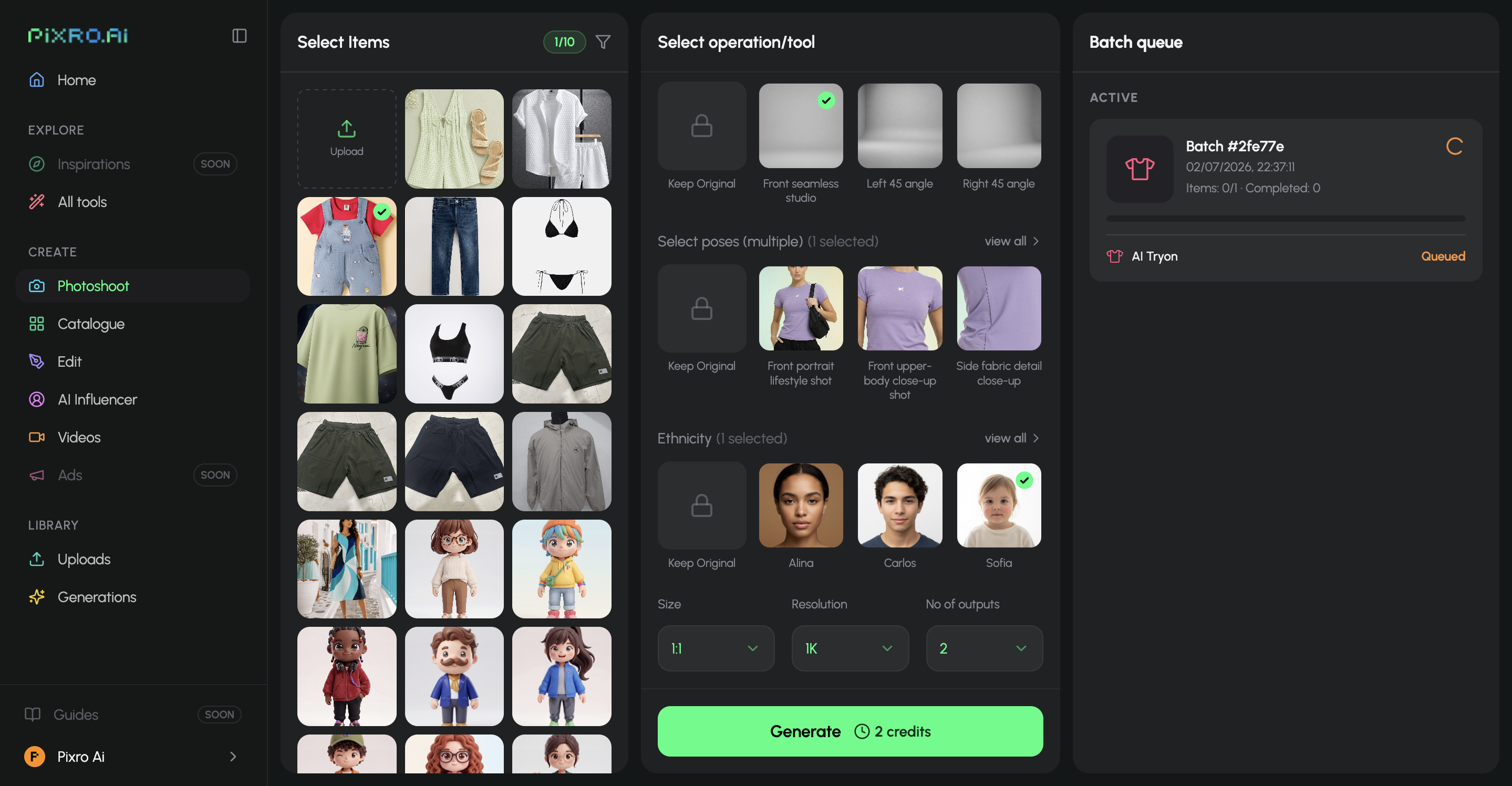
SellerPic is a clean web app with a Shopify presence — reviewers call it friendly, and it is, but it's still a menu-and-panel studio you learn.
Pixro is a browser app too — no install — but the way you drive it is the difference. Instead of clicking through tools, you open the AI-agent chat, say what you want to create, and a team of AI agents handles the brief: picks the right tool, picks the right model from 40+, and produces the creative. You can also connect your Shopify store, website URL, product catalogue or brand assets and let Pixro generate ecommerce-, ad- and social-ready assets on a schedule — set it once, get fresh creatives every day. Enterprise APIs too.
Bottom line: choose SellerPic if you want a familiar dashboard. Pixro if telling an AI-agent chat what you need — and letting it run always-on — beats learning a console.
Support and delivery
SellerPic offers standard SaaS support, and most reviewers find the team responsive. But a recurring gripe on review sites (as of mid-2026 — check current reviews) is billing friction — sellers charged after downgrading, or credits lost to errors with slow resolution. Worth knowing before you commit a card.
Pixro pairs self-serve with always-on delivery: connect your store or channels and the platform can push ready-to-use creatives on a schedule, so you're not re-exporting by hand.
Bottom line: choose SellerPic if self-serve with email support is fine. Pixro if you want creatives generated and delivered on autopilot, with a real team a message away.
Who SellerPic is best for
Genuinely — SellerPic is a good fit if you're a Shopify or Amazon seller comfortable in USD, you want a dedicated jewellery try-on flow, and image-to-video with lip-sync is on your must-have list today. The image quality earns its Shopify App Store standing, and for a store already run from a laptop it slots in cleanly. If you push thousands of images a month, its $99 Advanced tier is the cheapest per-credit bucket in this comparison.
Who Pixro is best for
Pixro is built for the brand that wants one tool for the whole visual workflow — image and video — instead of a photo-only point studio. If your catalogue mixes apparel, eyewear, footwear and jewellery, if you want banners, catalogue, AI influencers and reels from the same balance you use for product shots, and if you'd rather brief an AI-agent chat (and let 40+ models get auto-picked for you) than click through panels, that's the whole pitch. Brands like HRX, The Roadster, Reliance Jewels and The Kids Label already run on it.
How Pixro and SellerPic score
An honest scorecard — the dots show relative strength, and the edge column names who genuinely wins each row.
| Dimension | Pixro | SellerPic | Edge |
|---|---|---|---|
| Output / try-on quality | ●●●●○ | ●●●●○ | Tie |
| All-in-one breadth | ●●●●● | ●●●○○ | Pixro |
| Video + reels | ●●●●○ | ●●●○○ | Pixro |
| AI-agent workflow | ●●●●● | ●●○○○ | Pixro |
| Model range | ●●●●● | ●●○○○ | Pixro |
| Pricing & value | ●●●●○ | ●●●○○ | Pixro (entry) · SellerPic (bulk) |
| Lip-sync video today | ●●●○○ | ●●●●○ | SellerPic |
| Shopify / marketplace fit | ●●●○○ | ●●●●○ | SellerPic |
Overall read: a near-tie on raw output; Pixro pulls ahead on all-in-one breadth, live video, its AI-agent workflow, model range and entry-tier credit value, while SellerPic leads on a named lip-sync feature and deep Shopify integration.
Switching from SellerPic: what transfers

Almost nothing to migrate, really — these are generators, not databases. Your source photos are the only asset that moves, and they work as-is.
What changes:
- The interface. You trade a menu-driven dashboard for an AI-agent chat. Brief it the same way you'd have set up an upload.
- The toolset. One balance now covers product photoshoot, try-on, ghost mannequin, flat-lay, catalogue, banners, AI influencers and video reels — instead of a photo-only studio.
- The billing. Both meter USD credits — but line up the tiers: $30 buys 400 Pixro credits vs $29 for 200 on SellerPic (per each site, as of July 2026).
Common switch triggers we hear: wanting more than a photo studio, wanting live video without a 10x credit hit, and credits expiring unused on a monthly meter. If those are your reasons, the move is low-friction. For a broader look at fashion-model generators, our Botika vs FASHN AI comparison lays out how these engines differ.
FAQ
Is SellerPic worth it?
For a Shopify or Amazon seller comfortable paying in USD, yes — it's a capable, well-reviewed tool with strong AI models, jewellery try-on and a named lip-sync video feature. The watch-outs are month-end credit expiry, video costing roughly 10x an image, and some billing complaints on review sites (per review sites, mid-2026 — check current reviews).
What's the best SellerPic alternative?
Pixro is the natural fit: the same fashion and product suite — try-on, ghost mannequin, catalogue builder, image and video — but wider (banners, AI influencers, bulk catalogue, 6+ live video tools) and driven by an AI-agent chat that auto-picks from 40+ models. Compare it against other options in our Pixro vs Caimera, Pixro vs WhatMore, and Pixro vs Aiuta breakdowns.
Is Pixro web-based, and how do I access it?
Yes — Pixro is a browser app at pixro.ai, nothing to install. You sign in, open the AI-agent chat, tell it what you want to create, and a team of AI agents produces it using whichever of 40+ models fits the job. You can also connect your Shopify store or catalogue for always-on delivery. If you need the team, reach them on WhatsApp at +91 6364871993 or email hello@pixro.ai.
Does Pixro do video like SellerPic?
Yes — and more of it. Pixro ships 6+ live video tools today: AI reels, product videos and commercials, image-to-video, UGC videos and a fashion reel maker, all in the same workspace as the image suite. SellerPic's video strength is its named lip-sync feature specifically.
Does Pixro do jewellery try-on like SellerPic?
Yes — jewellery is one of six try-on categories (cloth, accessories, eyewear, shoes, jewellery), so you can run a mixed catalogue through one tool instead of separate flows.
Does Pixro have a free plan?
Pixro doesn't have a permanently-free tier — it's credit-based. What you get is a free trial of the paid $10 Trial plan (50 credits, roughly 30 photos or videos), plus pay-as-you-go credit packs, so you can test it on your own catalogue before committing. SellerPic offers a standing free tier of 20 credits (per its pricing page, as of July 2026).
Is SellerPic cheaper than Pixro?
Both bill in USD credits, so compare credit value, not currency. SellerPic runs Free (20 credits) then $29/200, $79/600 and $99/3,000; Pixro runs $10/50 and $30/400 (per each site, as of July 2026). At the entry and mid tiers Pixro gives more credits per dollar — $30 for 400 vs $29 for 200 — while SellerPic's $99 tier is the cheapest bulk bucket. Factor in SellerPic's monthly credit expiry and Pixro's wider toolset per credit, then verify both on the live sites, since prices move.
The one photo test
You've got a product photo on your phone right now. The kurta, the earring, the sneaker.
Open Pixro, drop it into the AI-agent chat, and watch the on-model version — plus a reel and a couple of try-ons — come back in under a minute, then judge it against whatever you're paying today. If one balance across the whole workflow, live video, and an AI crew that picks the models for you fit how you actually run the shop, you already know. Start with the $10 Trial and decide with your own catalogue, not ours.








